For years, Galaxy phone users have enjoyed the convenience of Samsung DeX, allowing them to access a desktop interface. Now, Google Pixel users can experience a similar innovation with the latest Android 16 QPR3 update, released in early March 2026. This new feature enables Pixel 8 and newer models to connect to a monitor and utilize a desktop-like interface.
For those unfamiliar with desktop modes, they transform your mobile experience into something akin to a Windows or macOS setup. While the core Android software and applications remain unchanged, users gain a taskbar, the ability to run multiple apps in separate windows, and several other enhancements aimed at boosting productivity.
Imagine sitting at your desk, seamlessly transitioning from your mobile apps to a larger display, complemented by a mouse and keyboard. Applications like Slack and Google Docs have evolved enough that they offer nearly all desktop functionalities on mobile, making this transition smoother than ever.
However, there are prerequisites to utilizing this feature. A Pixel 8 or newer device is essential, along with a USB-C DisplayPort connection. Users will also need to connect a Bluetooth mouse and keyboard, as the current version does not support using the phone as a trackpad like Samsung's offering.
Navigating Desktop Mode on a Pixel
Although this desktop mode is now an official part of Android, users should not expect a flawless experience just yet. For instance, connecting a Pixel 9 to a monitor via USB-C-to-DisplayPort worked only directly, not through a hub, and the maximum display resolution is capped at 1080p.
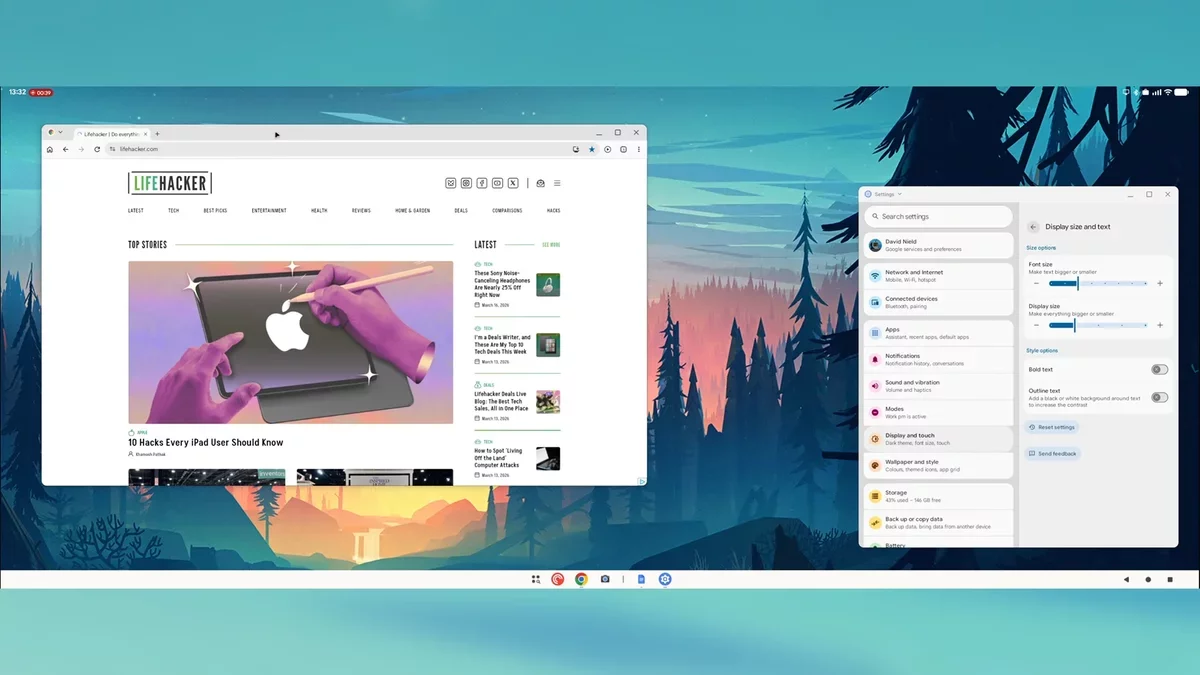
Once connected, users can choose to either mirror their phone's display or enter the new Desktop mode. Upon selecting the latter, users will be greeted with a desktop interface, ready for interaction with a mouse.
The interface is user-friendly, featuring a taskbar for app access, navigation buttons, and a launcher for additional applications. Each app opens in a movable and resizable window, with the option to snap two apps side by side for multitasking.
One of the significant advantages is that Chrome operates in desktop mode, allowing users to enjoy a comprehensive web experience rather than being limited to mobile versions. However, logging into services like Google Docs or Slack may redirect users to their respective mobile apps, slightly detracting from the desktop experience.
Despite being in its early stages, this feature is functional. Users can effectively work on documents via Google Docs on an external display, and many appreciate the convenience of larger displays for apps like podcasts and chat services.
As app developers adapt to this new desktop mode, some applications may still exhibit issues, such as misaligned buttons or oversized text. Nevertheless, it is anticipated that these challenges will be addressed over time, and further enhancements from Google could refine this experience. With continued development, this feature has the potential to revolutionize how users interact with their mobile devices in a desktop environment.