Searching for messages in Apple's Messages app has often been a frustrating experience. Although improvements have been made recently, including the introduction of search filters, the process can still feel tedious and convoluted, particularly when trying to locate a specific text. Fortunately, there's an innovative workaround that significantly enhances the functionality of Apple's native search feature.
Challenges of Searching in Messages
For many users, the standard method for finding texts on an iPhone involves launching the Messages app, tapping the search bar, and entering the desired keywords. However, this approach often yields an overwhelming amount of results, which can be counterproductive.
For instance, when searching for a contact's name, iOS 26 displays multiple chat threads, pinned conversations, shared notes, links, images, locations, and documents. While this comprehensive search can be beneficial for detailed inquiries, it complicates the process when one is simply trying to find a specific message.
The Quickest Method to Search Texts in iOS 26
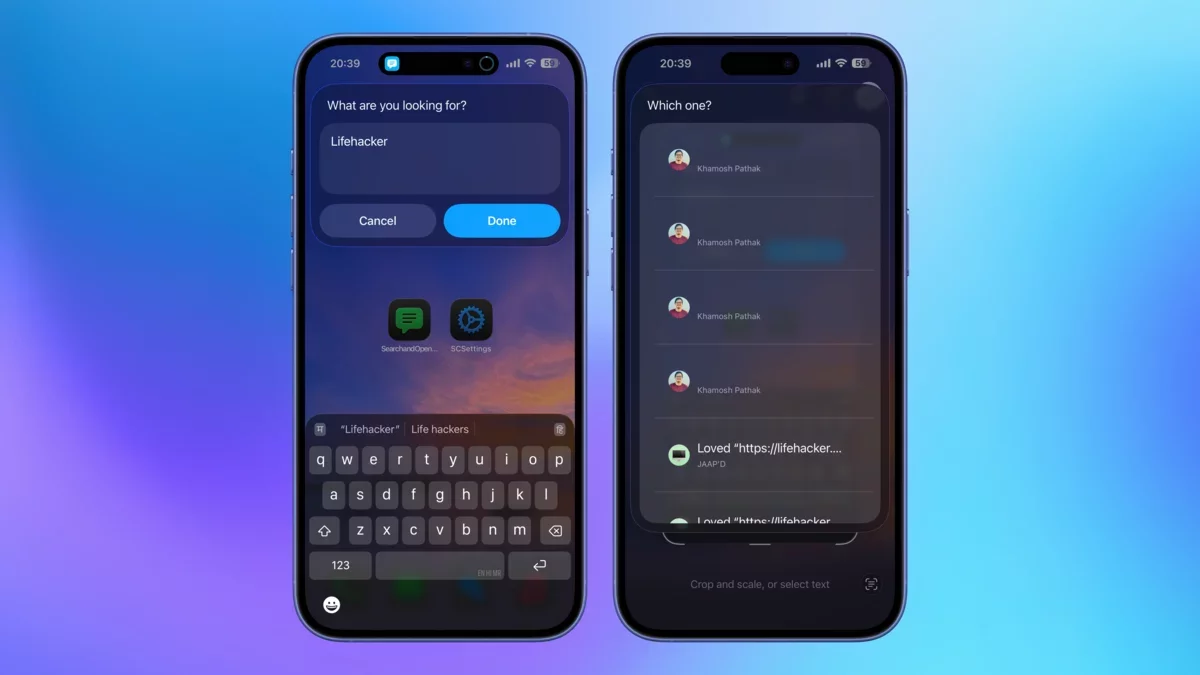
This is where the shortcut comes into play. Begin by opening the Shortcuts app on your iPhone and installing the "Search and Open Messages" shortcut. This tool utilizes new features introduced in iOS 26, enabling users to quickly search for text messages and access them with a single tap.
Once set up, you can activate this shortcut from the Shortcuts app or conveniently add it to your Home Screen for quick access. The shortcut prompts you to enter your search terms, and within moments, it displays all relevant chats. In some instances, it even emphasizes the exact sentence containing your keywords. Additionally, it can identify keywords in shared images, which appear as "blank" entries in the results, but tapping them will reveal the corresponding image.
Upon selecting a result, the shortcut directs you to the precise part of the conversation, eliminating the need to sift through numerous entries to find the one you want. This is the type of feature that Apple should consider integrating into the Messages app in the future. Until then, this shortcut serves as an excellent solution.